

Find Photos by Day and Month Across Years in IMatch
Did you know that IMatch can find photos, videos, and other files created on the same day and month across multiple years? That makes it handy for birthdays, anniversaries, holidays, recurring events, seasonal research, long-term projects — and, of course, that suspicious number of April 1 photos in your archive.
Using the Date Filter in IMatch for ‘Day Over the Years’
1. Open the Filter Panel when it is closed via View menu > Panels > Filter.
The keyboard shortcut is F9, L.
2. If the Date filter is not listed, click the gear icon and select it from the drop-down list.
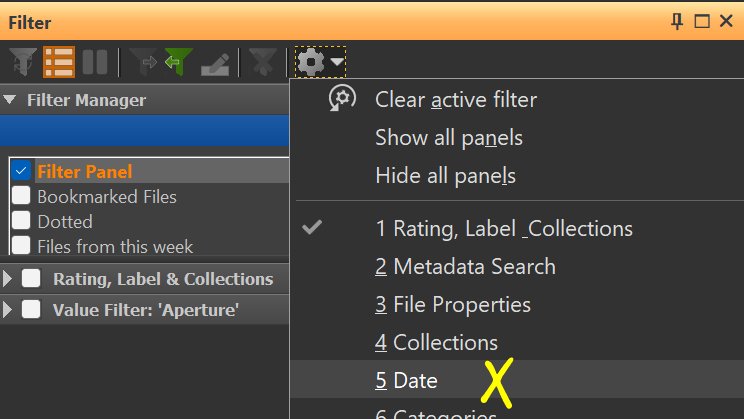
3. In the Date Filter, select Birthday (Day and Month), as shown in this screenshot:
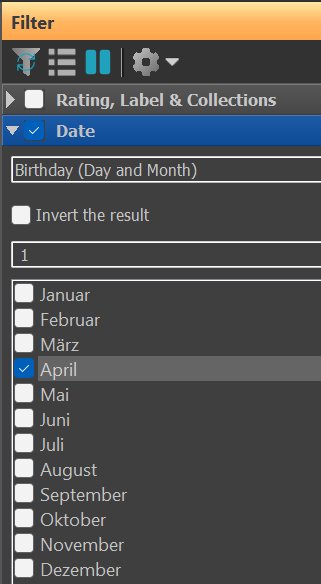
Make sure the check mark is set in the Date Filter caption bar to enable the Date Filter. The caption bar becomes blue when a filter is enabled.
The Date Filter now filters the current scope (File Window contents) and shows only files created on April 1.
This works like the popular Today Over the Years feature offered by many cloud services and phones, but with one useful difference: you can choose the day yourself.
As always, if you want to apply the filter to your entire database, select the database node in the Media and Folders View or the @All node in the Category View. You can also apply the filter to specific folders, categories, events, or people.
Seeing All Images Taken on a Person’s Birthday
There are two ways to do this in IMatch:
1. In the People View
Select the person, then apply the Date Filter set to the day and month of that person’s birth.
2. Anywhere Else
Just combine the People Filter with the Date Filter:
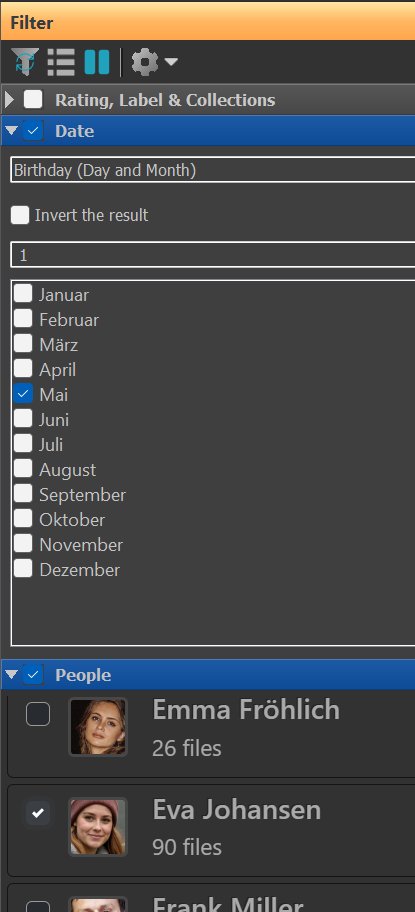
This filter shows only files created on May 1 that also contain the person Eva Johansen.
Variants of This Filter
IMatch offers two additional variants of this filter type:
1. Month
This variant enables you to see all photos taken in one or more selected months. As always, you control which files are filtered via the File Window and any other filters you apply.
2. Year and Month
This filter enables you to find files taken in one or more selected months of a specific year.
These filters are most often combined with other filters. For example, to see the best shots of selected months over time by your ranking, combine the Month filter with the Rating filter.
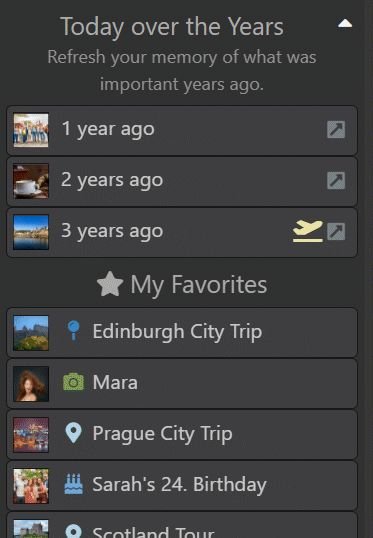
Tip: ‘Today over the Years’ in the Event View
The Favorites Bar in the IMatch Event View gives direct access to files created on today’s date over the years:
Summary
Using the Birthday mode of the Date Filter in IMatch makes it easy to find images and other files taken on a specific day and month, across any years included in the current scope. Combine it with other filters to narrow the result to a folder, category, event, person, rating, or any other criteria that help you get to the files you actually want.

Mario M. Westphal is the developer of IMatch, the digital asset management system (DAM) for Windows. He has a strong background in software development and photography, gained through working for over 30 years in the field for many clients. His special interests are photography, music. literature and of course software development, with a strong focus on digital asset management, database systems and image metadata. He hails from Germany.
You can reach him in the IMatch user community and via support@photools.com.