

IMatch Semantic Search: Find Photos and Digital Assets by Meaning with IMatch AI
IMatch 2026 introduced a new integrated AI (IMatch AI) and a new smart way to search descriptions, keywords, and other metadata contained in your IMatch database.
Finding the right file in a collection of tens or hundreds of thousands of assets used to depend on remembering the exact words stored in metadata. IMatch semantic search changes that by searching for meaning instead of matching text literally.
You can describe what you are looking for in ordinary language, a process sometimes called using natural language queries. IMatch can then discover relevant files even when their descriptions use different words.
From Exact Words to Meaning
A conventional metadata search is precise but literal. A search for “car” may find “car” and “cars,” yet miss images described with “automobile” or “auto.” Semantic search bridges that vocabulary gap. It understands relationships among singular and plural forms, synonyms, related terms, and broader concepts. A query for “senior people,” for example, can surface descriptions containing “older people,” “elderly,” or “grandma.” Likewise, “young people” can connect with “boy,” “girl,” or “child.”
The same principle applies to conceptual associations. IMatch can connect Tokyo with Japan, fish with sushi, beef with burgers, cola with soda, or Mexican food with descriptions that mention chili. This makes search more forgiving and much closer to the way people actually remember images and documents.
Ask for What You Remember
Suppose you remember the idea “a person riding a bike,” but not how any individual file was tagged. Semantic search can find descriptions about a woman riding a bicycle, two cyclists on a street, riders silhouetted against a sunset, someone leaning on a scooter, or a biker on a motorcycle. The wording, and even the exact kind of vehicle, may differ, but the underlying concept is similar.
With a traditional search, retrieving the same set might require several queries, carefully chosen synonyms, or a complex Boolean expression. Semantic search turns that effort into one natural-language request. It is especially useful when metadata was written by different people, generated at different times, or created by an AI model whose vocabulary does not exactly match your own.
How IMatch Semantic Search Works
IMatch uses its integrated IMatch AI to create compact numerical representations, called embeddings, from selected metadata fields. Typical sources are detailed descriptions and hierarchical keywords, including text entered manually or generated with IMatch AutoTagger. Files whose metadata expresses similar ideas end up close to one another in this semantic space.
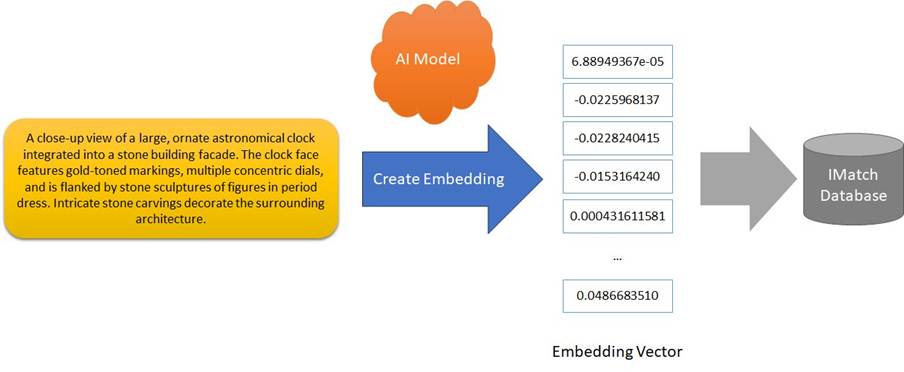
Searching
When you enter a query, IMatch creates an embedding for the query and compares it with the embeddings stored for your files. The result is a relevance-oriented search based on conceptual similarity, not merely matching character strings.
This does not replace IMatch’s established tools for searching file names, folders, categories, metadata, duplicates, copies, visually similar images, or sketch-based matches. It adds another powerful way into the same collection.
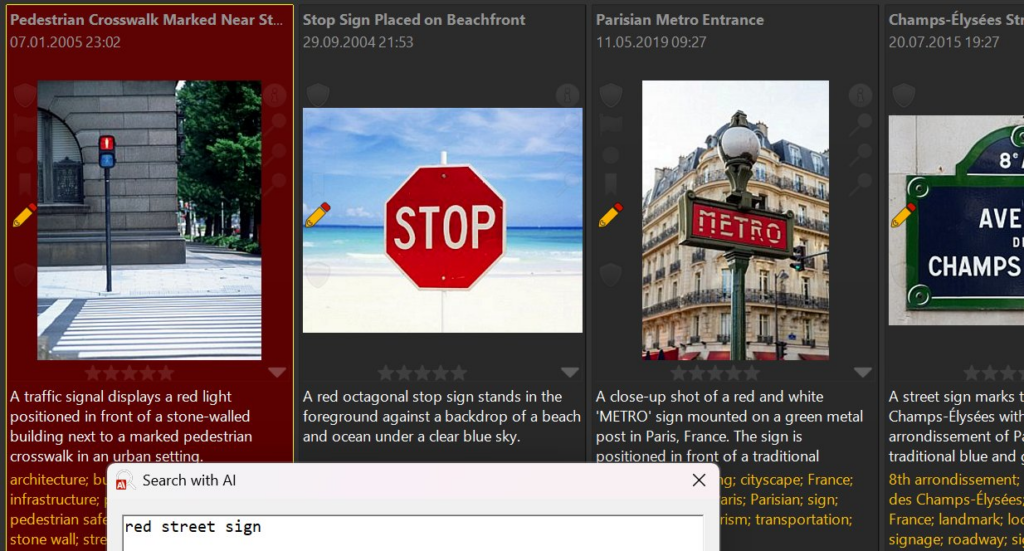
Why It Matters for Large Collections
- Less dependence on perfect keywords. You can find useful assets even when the exact word you expected is missing.
- Faster exploration. A single descriptive query can replace multiple searches and complicated Boolean logic.
- Better recall across inconsistent metadata. Synonyms, related concepts, and differences in wording become less of a barrier.
- Natural discovery. Search the way you think: by scene, subject, activity, topic, or concept.
- More value from existing metadata. Descriptions and keywords you already maintain, manually or with AutoTagger, become the foundation for a new retrieval method.
For photographers, that might mean rediscovering “quiet winter streets,” “children playing near water,” or “dramatic backlit portraits” without building a perfect keyword hierarchy first. Librarians and archivists can search across descriptions written by different catalogers. Researchers can retrieve material around a topic even when terminology varies between projects or disciplines. Anyone managing a long-lived collection gains a more flexible way to work with metadata accumulated over many years.
Good Metadata Still Makes the Difference
Semantic search is flexible, but it is not magic: the quality of its results depends on the text used to create the embeddings. Detailed, meaningful descriptions generally produce stronger results than short or incomplete phrases. In the IMatch AI settings, you choose which metadata tags contribute to the semantic index and can set a minimum text length to keep weak or empty values from reducing search quality.
For even better retrieval quality, you can use AutoTagger with a purpose-built prompt to populate a custom metadata tag with text optimized for creating embeddings. This gives semantic search a focused, consistent source instead of relying only on metadata created for other purposes. The IMatch help system explains this workflow in detail and includes sample prompts you can adapt to your collection.
A sensible way to get started is to create a representative test set, perhaps several hundred images covering different subjects and metadata styles. You can then experiment with the selected tags or AutoTagger prompts before processing the entire database. IMatch can exclude a category from embedding generation, making it practical to limit these early tests.
A Better Way to Browse What You Already Own
Semantic search makes a large IMatch database feel less like a rigid catalog and more like a collection you can converse with. It complements precise metadata searches with discovery based on meaning, helping you find forgotten images, documents, videos, and other assets even when your query and their metadata do not share the same words. If you already invest in descriptions and keywords, or use AutoTagger to create them, semantic search gives that work an immediate new payoff.
Ready to experiment? Read the official Semantic Search with AI help topic, enable the feature, build a small test index, and try describing an asset the way you remember it rather than the way it might have been tagged.

Mario M. Westphal is the developer of IMatch, the digital asset management system (DAM) for Windows. He has a strong background in software development and photography, gained through working for over 30 years in the field for many clients. His special interests are photography, music. literature and of course software development, with a strong focus on digital asset management, database systems and image metadata. He hails from Germany.
You can reach him in the IMatch user community and via support@photools.com.