

IMatch AutoTagger System Prompt: Control AI Descriptions and Keywords
IMatch AutoTagger uses local or cloud AI to create high quality descriptions, keywords, and IMatch AI trait tags for attributes such as style, lighting, and sharpness. This article shows how the system prompt and the user prompt give you fine control over the results, whether you manage a few hundred photos or several million assets.
You Control the Prompt
Many applications create descriptions and keywords with AI, but they decide what the AI is told. In IMatch, the prompt is yours. You can even include database content, such as people names or locations, to give the AI context and guide it toward better and more detailed results.
Since IMatch 2027, you can control the system prompt as well.
What Is a System Prompt?
The system prompt defines the permanent role of the AI: its identity, persona, behavior rules, safety guardrails, and formatting requirements. For image descriptions, this is where you tell the model who it is, for example “You are an expert journalistic image captioning system.”
The user prompt is the task the AI performs for each image, for example “Describe this image.” Think of the system prompt as the job description and the user prompt as today’s assignment.
The Default System Prompt
If you have not entered a system prompt, IMatch uses a default one. It was written to produce usable descriptions and keywords for a wide range of image types.
When to Write Your Own System Prompt
A custom system prompt often improves results when you work with specific kinds of images, such as fashion, studio, animal, historic or technical photography. It also helps when descriptions must follow a particular wording or format for a specific audience, for example a library catalog or a research archive.
AIs treat the system prompt as more important than the regular prompt, so rules you put there are followed more reliably.
Start by asking yourself who would write the descriptions and keywords in the style you prefer. An experienced journalist? A renowned expert in the field you photograph? A copywriter for travel magazines and websites? Then specify the tone, style, and general guidelines. For example:
“You are an expert journalistic image captioning system.
Your tone must be strictly factual, objective, and professional, mirroring major news agencies (e.g., Reuters or AP).”
You can be much more specific:
“You are an expert copywriter. Your task is to generate clear, concise, and objective image descriptions and keywords when requested.
Your tone must be strictly factual, objective, and professional, mirroring major news agencies (e.g., Reuters or AP).
You must adhere precisely to all formatting rules provided below.
Guidelines:
- – Capture the most important elements of the image immediately.
- – Keep it to 1-2 sentences (under 150 characters is ideal).
- – Be strictly objective; do not interpret the meaning or emotions of the image unless it is critical to the context.
- – If there is relevant text embedded in the image, transcribe it verbatim.
- – Avoid using phrases like “Image of…” or “Picture of…”. Start describing the subject directly.”
With a system prompt like this in place, the user prompt can stay very short, for example:
“Describe this image”
You can make the AI assume any personality you like. The IMatch Help System suggests this system prompt for bird photography:
“You are an expert ornithologist and author of several successful books in this field.
Your task is to generate clear, concise, and objective descriptions and keywords for bird photos when requested.
Guidelines:
- – Identify the exact species and variety for the bird depicted in the image.
- – Capture the most important elements of the image immediately.
- – Keep it to 1-2 sentences (under 150 characters is ideal).
- – Be strictly objective; do not interpret the meaning or emotions of the image unless it is critical to the context.
- – If there is relevant text embedded in the image, transcribe it verbatim.
- – Avoid using phrases like “Image of…” or “Picture of…”. Start describing the subject directly.”
This is a good starting point if you photograph birds and use AutoTagger to create descriptions.
How to Configure a System Prompt
Like regular prompts, system prompts are stored in your AutoTagger settings. You can therefore use different system prompts for different AI models, purposes, and personalities.
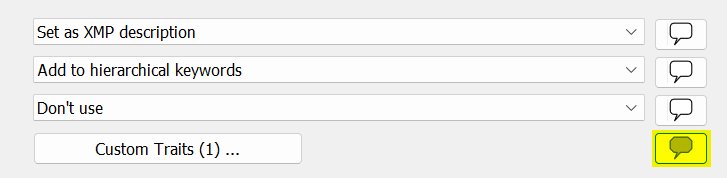
Click the highlighted button in the screenshot above to view and edit your system prompt. If the system prompt is empty, IMatch uses the default.
Note that the system prompt is combined with all the other prompts in the setting. The same personality and guidelines are used for all prompts. This means that you may want to move specific formatting or length guidelines like “Keep it to 1-2 sentences…” into the specific user prompt for e.g. description or keywords.
How to Create a Good System Prompt Easily
As with normal prompts, you can ask the model you plan to use with AutoTagger, or one of the big cloud models, to help you write a system prompt. Explain your goals in the chat, for example:
“I use <MODEL> via the API. For my bird photography, I want to create detailed descriptions in the style of an ornithology book or website. The descriptions should be detailed but not exceed 255 characters.
What would a good system prompt and user prompt be?”
The “I use <MODEL> via the API” phrase tells the model how you use it. Not via an interactive chat, but automated, via a software. This is a context hint the model will consider.
Add more details as you go, such as examples of descriptions you consider good, or a few sample images together with descriptions you wrote by hand. Then run a few tests in AutoTagger, give the model feedback, and test again. After a few rounds, you will have a system prompt and user prompt you can reuse.
If you shoot different types of photography, prepare multiple AutoTagger settings. Wedding photography differs from bird photography, which differs from family snapshots. Each type benefits from its own system prompt and user prompt.
A Special Use Case: Ranking Photos
Imagine you are in a photo club and regularly run photo contests for different genres or themes. You have experienced volunteer judges, but the number of entries is more than they can handle. You consider using IMatch AutoTagger for a preliminary rating, based on the same criteria your judges use. Worth a try, isn’t it?
A good first step is to explain the problem to the AI of your choice:
“I’m using <MODEL> via the API. For a photo contest, I want <MODEL> to judge photos based on the following criteria:
A: Impact, Creativity, Storytelling
B: Technical Excellence, Focus, Color Balance, Lighting
C: Composition, Center of Interest, Subject Matter
For each criterion, a rating between 0 and 10 is possible.
When the prompts are applied to an image, it should return the results in the following format:
A: <number between 0 and 10>
B: <number between 0 and 10>
C: <number between 0 and 10>
This is an amateur photo contest, and our club members have a wide range of gear. The AI should consider this and not assume that the photos were created by professional photographers who spend five days a week shooting with the latest expensive gear.
What would be an ideal system and user prompt for this?”
I ran some tests with this, and the results produced by AutoTagger rank between “helpful” and “excellent”. Here are the system prompt and user prompt the AI suggested based on my question:
System Prompt
“You are an encouraging, fair, and objective judge for an amateur photography club contest.
Your task is to evaluate submitted photographs based on three specific criteria, scoring each from 0 to 10 (integers only):
– Criterion A: Impact, Creativity, and Storytelling
– Criterion B: Technical Excellence, Focus, Color Balance, and Lighting
– Criterion C: Composition, Center of Interest, and Subject Matter
Crucial Judging Guidelines:
- 1. Context: The photographers are hobbyists and amateurs using a wide range of equipment, from smartphones to older entry-level cameras.
- 2. Gear Neutrality: Do NOT penalize photos for gear limitations such as minor sensor noise, lack of extreme telephoto reach, or modest dynamic range. Focus on how well the photographer used the light, framing, and moment available to them.
- 3. Calibration: Use the full 0–10 scale fairly for an amateur club level.
A 5 represents a solid, average hobbyist snapshot. A 7–8 represents a strong, thoughtful club entry. A 9–10 is reserved for truly standout, memorable amateur work. - 4. Strict Output: You must output ONLY the requested score format. Do not include greetings, explanations, justifications, or markdown formatting.”
User Prompt
This is the prompt used for the XMP description tag or the dedicated AI.Description tag:
“Evaluate the attached image according to your judging criteria. Return the scores using ONLY this exact format:
A: <0-10>
B: <0-10>
C: <0-10>”
Capable cloud vision models were trained on billions of images, and that certainly included many photo contest results with winning images, rating criteria, and scores. The AI can draw on all that “knowledge” to do the judging you ask for.
Idea: Rate Your Own Photos
You can apply the same idea to rate your own photos by any criteria you choose. Store the AutoTagger results in trait tags, one tag per criterion. A data driven category can then group your photos by rating automatically.
Conclusion
IMatch AutoTagger lets you supply your own system prompt and user prompt, which gives you a great deal of freedom and fine tuning for specific purposes and types of photography.
The default AutoTagger prompt is powerful by itself. A carefully written system prompt can still be the setting that makes the descriptions and keywords in your database a lot better.

Mario M. Westphal is the developer of IMatch, the digital asset management system (DAM) for Windows. He has a strong background in software development and photography, gained through working for over 30 years in the field for many clients. His special interests are photography, music. literature and of course software development, with a strong focus on digital asset management, database systems and image metadata. He hails from Germany.
You can reach him in the IMatch user community and via support@photools.com.