image management

File Naming Conventions – Made Easy With IMatch’s unique Renamer

File Naming Conventions Made Easy with the IMatch Renamer File naming conventions help you keep images and other digital assets consistent and easier to find, sort, share, and archive. That matters for professional workflows with clients and teams, but it also pays off for hobby photographers, scientists, and librarians. This post is not about “the […]

File Naming Conventions – Made Easy With IMatch’s unique Renamer Read More »

The cure IMatch robot having a good time working on a laptop while sitting next to warm fire, and looking at a beautiful the winter landscape outside his windows.

IMatch 2025.7 Released (with support for GPT 5.2, Gemini 3 and Mistral 3.1)

We’re happy to announce the most recent update of IMatch 2025. This update contains bug fixes, enhancements of existing functionality and some new features. See the release notes for this release for detailed information. Some of the Highlights in this Release Read the release notes for a full list of enhancements, changes and bug fixes.

IMatch 2025.7 Released (with support for GPT 5.2, Gemini 3 and Mistral 3.1) Read More »

The default icon for Automation Favorites.

How IMatch Automation Favorites Turn Routine Tasks into Routines

IMatch’s Favorites are your secret weapon for efficiency—they’re not just shortcuts, but workflow accelerators. At their core, they let you execute repetitive tasks with a single click or keyboard shortcut from anywhere in the app. Think of them as customizable “macros” tailored to your daily grind: assign categories, move files between folders, open external apps,

How IMatch Automation Favorites Turn Routine Tasks into Routines Read More »

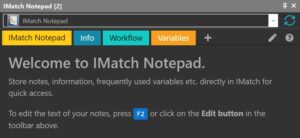
IMatch Notepad Start Page.

IMatch Notepad: Track Settings, Instructions & Tips Within IMatch

IMatch Notepad: Track Settings, Instructions & Tips Within IMatch IMatch is known for its powerful organization capabilities, but did you know there’s a built-in tool that can significantly enhance your workflow? Introducing IMatch Notepad, a handy application designed to keep your notes, settings, and tips right at your fingertips within the IMatch environment. This isn’t

IMatch Notepad: Track Settings, Instructions & Tips Within IMatch Read More »

A newbie user working with the IMatch Command Palette.

New to IMatch or an Infrequent User? Then the Command Palette is Your Friend!

New to IMatch or an Infrequent User?Then the Command Palette is Your Friend! IMatch is a feature-rich application with numerous functions and commands. For those who don’t use IMatch frequently, recalling all available commands and their corresponding keyboard shortcuts can be challenging. To easily access the Command Palette in IMatch, press Shift+Ctrl+P or Ctrl+Q. The

New to IMatch or an Infrequent User? Then the Command Palette is Your Friend! Read More »

photools.com Logo

WIC Support and Codec Availability

What is IMatch? IMatch is one of the leading Digital Asset Management Systems (DAM) for Windows.Manage, catalog and organize all your RAW files, digital images, videos, audio recordings, PDF and Office documents etc. in one software. See what IMatch can do for you. What is WIC? IMatch supports the Windows Imaging Component (WIC) framework supported

WIC Support and Codec Availability Read More »